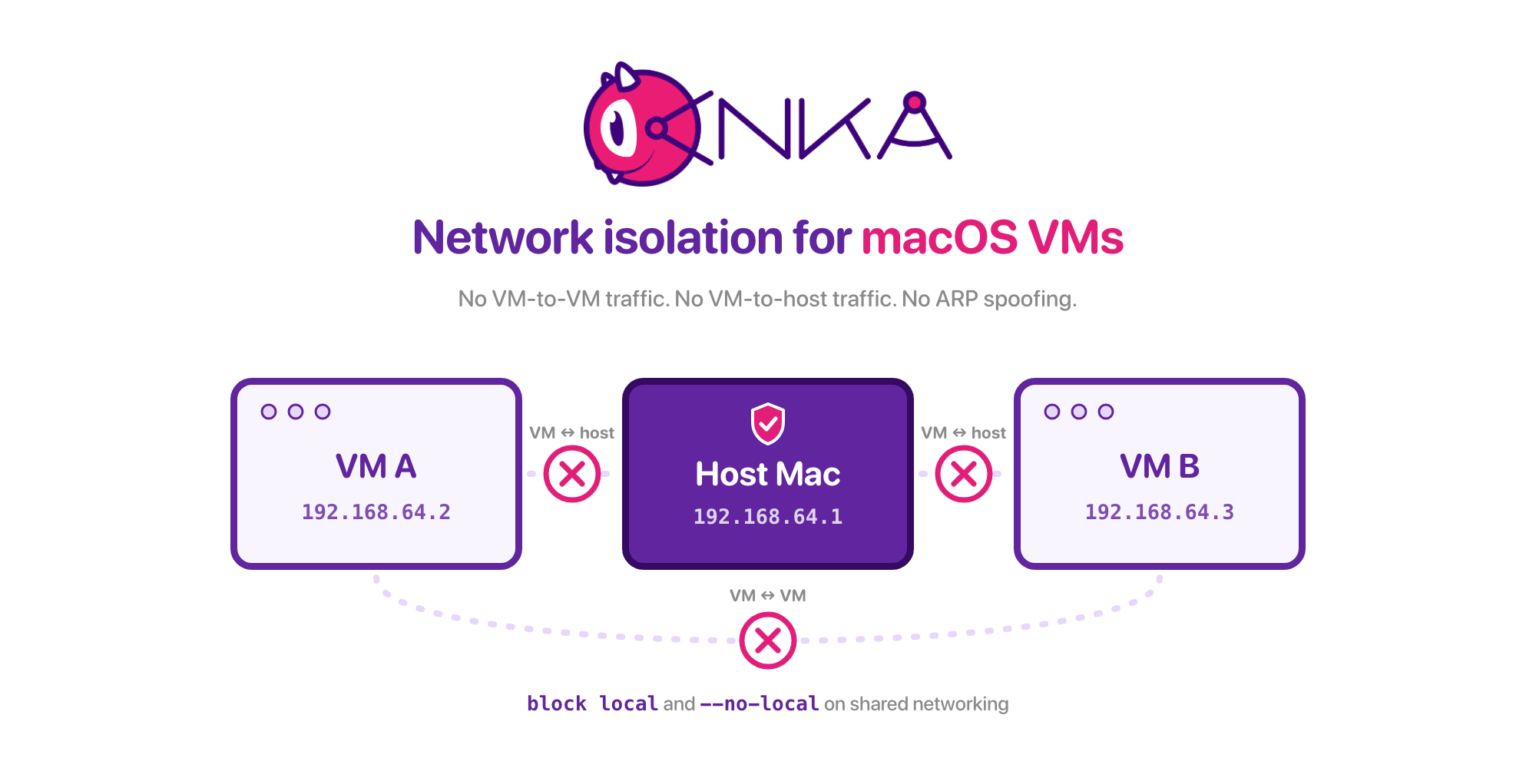
If your security questionnaire asks whether a macOS build agent can see the host, peer VMs on the same Mac, or spoof ARP on the virtual network, you need answers you can demonstrate, not a hope that NAT alone is enough.
The job to be done
Compliance and platform teams want a disposable macOS VM for iOS/macOS CI (or for an AI coding agent) that still obeys a clear network policy: deny lateral movement to the host, deny VM-to-VM chatter when required, and keep ARP spoofing off the table. Auditors ask for the control, the license tier, and proof the rule actually applied.
The problem
Default virtual networking is built for convenience. Guests often share a private subnet, can reach the host gateway, and can see neighbors. That is useful for SSH and package installs. It is the opposite of what a locked-down agent or a regulated build lane needs.
Most macOS virtualization tooling stops at Apple’s network defaults. If your requirement is that this guest cannot talk to the host or to other guests, you need controls beyond a 192.168 address.
Why isolation is hard on macOS VMs
Apple’s Virtualization stack gives you a working guest network quickly. It does not, by itself, give you an ipf-style rule file per VM, a one-flag cut of VM-to-host traffic, or a documented ARP spoofing stance across modes. Those are product features you either have or you invent with brittle host firewall glue that drifts per node.
How Anka handles it
Anka covers three concerns teams usually ask about together: VM-to-VM isolation, VM-to-host isolation, and ARP spoofing prevention. The practical controls sit on shared networking (NAT + DHCP on 192.168.64.x) plus Enterprise-tier IP filtering.
IP filtering and the advanced security CLI features require an Enterprise or Enterprise Plus license.
ARP spoofing prevention (default)
ARP spoofing is prevented by default in every network mode except experimental nat. If you switch a Silicon host to nat for throughput, you are explicitly leaving that default behind. Prefer shared when the compliance story includes ARP.
ARP isolation (hiding neighbor MAC/IP from arp -a) is a different knob. See --no-local below.
block local: both isolation directions
IP filtering (Anka 3.3+) mimics ipf.conf-style rules on a per-VM or per-host basis. To stop VM-to-VM and VM-to-host communication, use:
block localThat single rule is the compliance-friendly starting point when the guest should not reach the host or peer VMs on the machine, while you still use shared mode for the rest of the stack.
--no-local: cut VM-host traffic at the network card
If you want the network-card flag rather than a filter file, modify the VM with --no-local:
anka modify 15.6.1 network --no-local--no-local prevents VM-host connections. It also disables the VM-to-VM and VM-to-host paths that block local targets, and it is how you stop casual arp -a visibility of other guests, at the cost of those communication paths. Default is --local (allow VM-host connections).
Example: two shared-mode VMs on an Enterprise host, before and after block local.
# Baseline (no filter) - guest A can reach host gateway and peer B
anka-guest-a$ ping -c 2 192.168.64.1
PING 192.168.64.1 (192.168.64.1): 56 data bytes
64 bytes from 192.168.64.1: icmp_seq=0 ttl=64 time=0.412 ms
64 bytes from 192.168.64.1: icmp_seq=1 ttl=64 time=0.389 ms

anka-guest-a$ ping -c 2 192.168.64.3
PING 192.168.64.3 (192.168.64.3): 56 data bytes
64 bytes from 192.168.64.3: icmp_seq=0 ttl=64 time=0.521 ms
64 bytes from 192.168.64.3: icmp_seq=1 ttl=64 time=0.498 ms

# Apply filter on guest A
host$ echo "block local" | anka modify 15.6.1 network -f-
host$ anka show 15.6.1 network -f
block local

# After - host gateway and peer are unreachable
anka-guest-a$ ping -c 2 192.168.64.1
PING 192.168.64.1 (192.168.64.1): 56 data bytes
Request timeout for icmp_seq 0
Request timeout for icmp_seq 1

anka-guest-a$ ping -c 2 192.168.64.3
PING 192.168.64.3 (192.168.64.3): 56 data bytes
Request timeout for icmp_seq 0
Request timeout for icmp_seq 1

# Same isolation with the NIC flag instead of a filter file
host$ anka modify 15.6.1 network --filter off
host$ anka modify 15.6.1 network --no-local
anka-guest-a$ sudo arp -a
# (no peer MAC/IP entries for other shared guests)
IP filtering rules: order, replace, disable
Rules are checked in descending order. The first matching rule wins. Example of a foot-gun: block any before a pass means the pass never applies.
block any
pass out from all
Useful rule shapes:
block out to 1.1.1.1 from any
block out to 1.1.1.1 port 53
block in to port 22
block local
block any
Apply rules in three ways:
- Host-global file for every VM that does not already embed rules:
anka config net_filter /Users/myUser/vm-filter-rules- Path on the template (host file read at VM start):
anka modify 13.3.1 network --filter ./rules
anka show 13.3.1 network -f- Embed into the VM config (no file required on each host):
anka modify 13.3.1 network -f- < rules
# or a single rule:
echo "block any" | anka modify 13.3.1 network -f-
Applying new rules removes all previously set rules. Plan the full file each time; do not assume merge behavior.
Disable with:
anka modify 13.3.1 network --filter offExample: embed a two-rule set, confirm it with anka show, then replace it entirely with a single rule.
host$ cat <<'EOF' | anka modify 15.6.1 network -f-
pass out to 203.0.113.10
block local
EOF

host$ anka show 15.6.1 network -f
pass out to 203.0.113.10
block local

# Second apply replaces the previous set (no merge)
host$ echo "block any" | anka modify 15.6.1 network -f-
host$ anka show 15.6.1 network -f
block any

# Without Enterprise / Enterprise Plus, the same modify fails with a license error
host$ echo "block local" | anka modify 15.6.1 network -f-
Error: This feature requires an Enterprise or Enterprise Plus license
A compliance-shaped recipe
For a shared-mode CI or agent template that must not talk to the host or peer VMs:
# Ensure shared mode (IP filtering features are for shared networking)
anka modify locked-agent network --mode shared

cat <<'EOF' > /tmp/agent-net.rules
block local
# add explicit pass rules above block any if you need specific egress
block any
EOF

anka modify locked-agent network -f- < /tmp/agent-net.rules
anka show locked-agent network -f
Tighten further with --no-local if your policy wants the card-level cut. Keep experimental nat off this template so ARP spoofing prevention stays on.
For coding-agent workflows that layer Crypt on the same controls, the companion Crypt IP-filtering post walks the agent-specific lockdown; the underlying Anka rules are what this post covers.
When to use which control
| Requirement | Control | Notes |
|---|---|---|
| No VM↔VM and no VM↔host | block local on shared | IP filtering; Enterprise / Enterprise Plus |
| Hard disable VM-host at the NIC | --no-local | Also stops the neighbor visibility path |
| ARP spoofing prevention | Stay off nat | On by default in other modes |
| Allowlist egress only | pass rules then block any | First match wins; full replace on each apply |
| Fully offline | disconnected mode | No filter file required |
Do not promise host-global anka config net_filter will override a template that already has rules. The global file is ignored when the VM Template already has filters applied.
Thanks for reading. If you have any questions please reach out to the team at support@veertu.com or jump right in by requesting a trial license: https://veertu.com/getting-started-trials/